Workflow automation
Stop typing the same thing twice.
We automate the office work that follows the same steps every time, like supplier invoices, warranty registrations and orders typed into two systems, so your people can do the work that actually needs them.
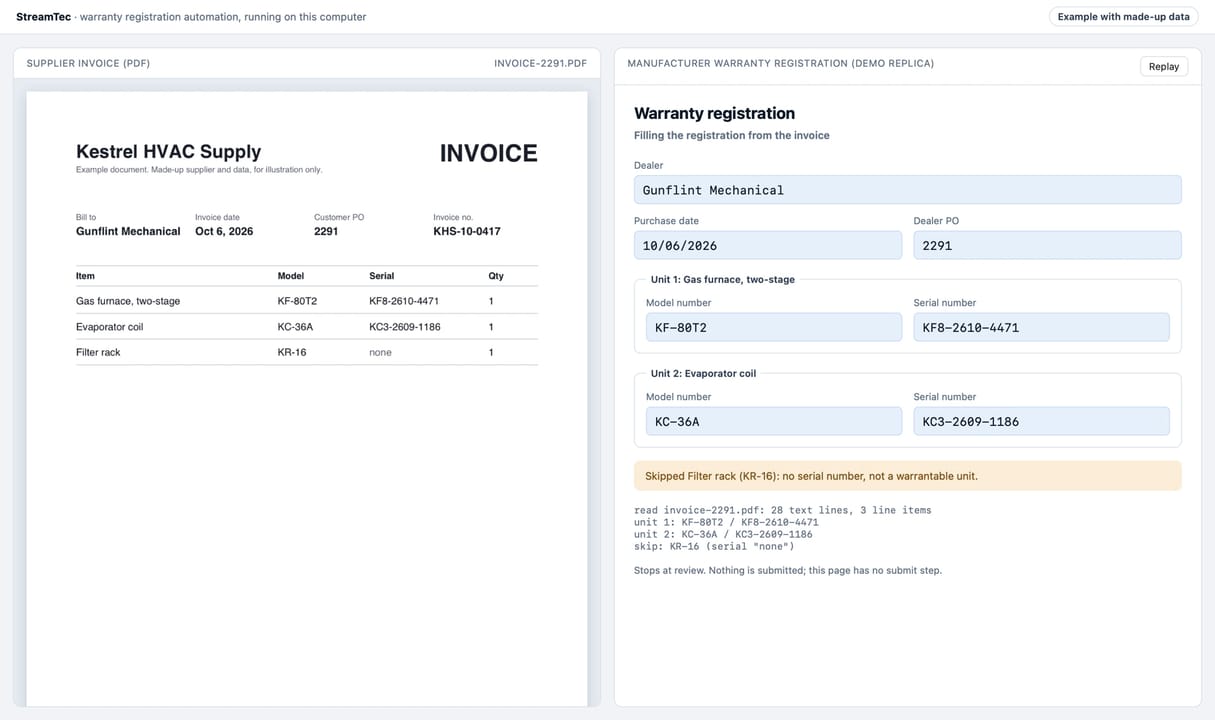
A supplier invoice PDF from Kestrel HVAC Supply sits on the left. The automation reads it and fills in the warranty registration on the right: the dealer, purchase date and PO, then the model and serial number for the furnace and the coil. The filter rack has no serial number, so it gets skipped. It stops at review and submits nothing.
What it looks like
A warranty registration from start to finish, on made-up data. Scroll through it, or watch the real automation run.
A supplier invoice lands in the inbox.
The automation watches one mailbox and only opens invoices from suppliers you approved. Anything else gets left alone.
It reads the invoice.
Model numbers, serial numbers, the dealer and the purchase date come off the PDF. A part without a serial number gets skipped, not guessed.
It fills out the registration.
Every field goes into the manufacturer’s site the way your office would type it. Nothing submits on its own until it’s been checked against your real documents.
The manufacturer confirms it.
Each unit gets its confirmation number, and a unit that’s already registered gets caught instead of sent twice.
Your tracker updates and you get the summary.
Every unit is logged with its confirmation, and anything that needs a person is flagged at the top.
Watch the real thing run (43 sec)Recorded demo of the real automation, made-up data. No sound.
What we automate
If someone in your office does it the same way every time, it’s a good candidate.
Supplier invoices and PDFs
Pull model numbers, serials, dates and totals off supplier invoices instead of retyping them.
Warranty registrations
Register units on manufacturer portals straight from the invoice, with every confirmation logged.
Data entry between systems
Enter it once and it shows up in the other system too: your CRM, accounting software or a supplier portal.
Online forms and portals
Fill the same web forms your office fills every week, the way your team would fill them.
Trackers and spreadsheets
Keep the tracker current on its own, so nobody has to update it at the end of the day.
Exceptions go to a person
Anything unusual gets flagged for someone in the office instead of guessed at.
From our work
Real work: warranty registrations, off the office’s plate
An HVAC contractor and an equipment distributor were both registering units by hand from supplier invoices. We built the automation shown above for each of them.
It reads each invoice as it arrives, fills in the registrations and keeps the tracker current. Depending on the business, it submits on its own or waits for someone in the office to approve each one.
Clients stay unnamed. The demos on this page use made-up data.
How it works
From the first call to ongoing support.
Free audit
A 15-minute call about where your week goes, then a short written plan of what we’d automate first.
Map the steps
We look at how the work gets done today, document by document, before we build anything.
Build and test
It runs in a sandbox on your real documents first. You check the output before it submits anything.
Go live
It starts running on its own, and the first runs get watched closely.
Ongoing support
When a supplier changes its invoice or a portal changes its form, we update the automation.
What kind of work can you automate?
Repetitive office tasks that follow the same steps every time: retyping invoices, pulling data out of supplier PDFs, filling out warranty registrations, and moving information between your CRM, accounting software, and supplier portals. If you do it the same way every week, it’s worth a look.
How do I know an automation won’t make mistakes?
Every automation runs in a sandbox against your real documents first. You see the output and check it, and it isn’t allowed to submit anything on its own until the output is right.
Do I have to switch the software I use now?
Usually not. We connect the tools you already have, like your CRM, accounting software, and supplier portals, instead of asking you to switch.
What’s the free automation audit?
You tell us what eats your week, and we send back a plain-English map of which tasks we can automate, what it would take, and what it would cost. It’s yours to keep whether you hire us or not.
What does your office type twice?
Tell us, and we’ll send back a short written plan of what we’d automate first. Free, and yours to keep.