For Bryant dealers
Bryant warranty registrations, done from the invoice.
Your distributor’s invoice email comes in, and every serialized unit gets registered on Bryant’s site with the confirmation logged. Nobody retypes a serial number, and you don’t need ServiceTitan or Housecall Pro.
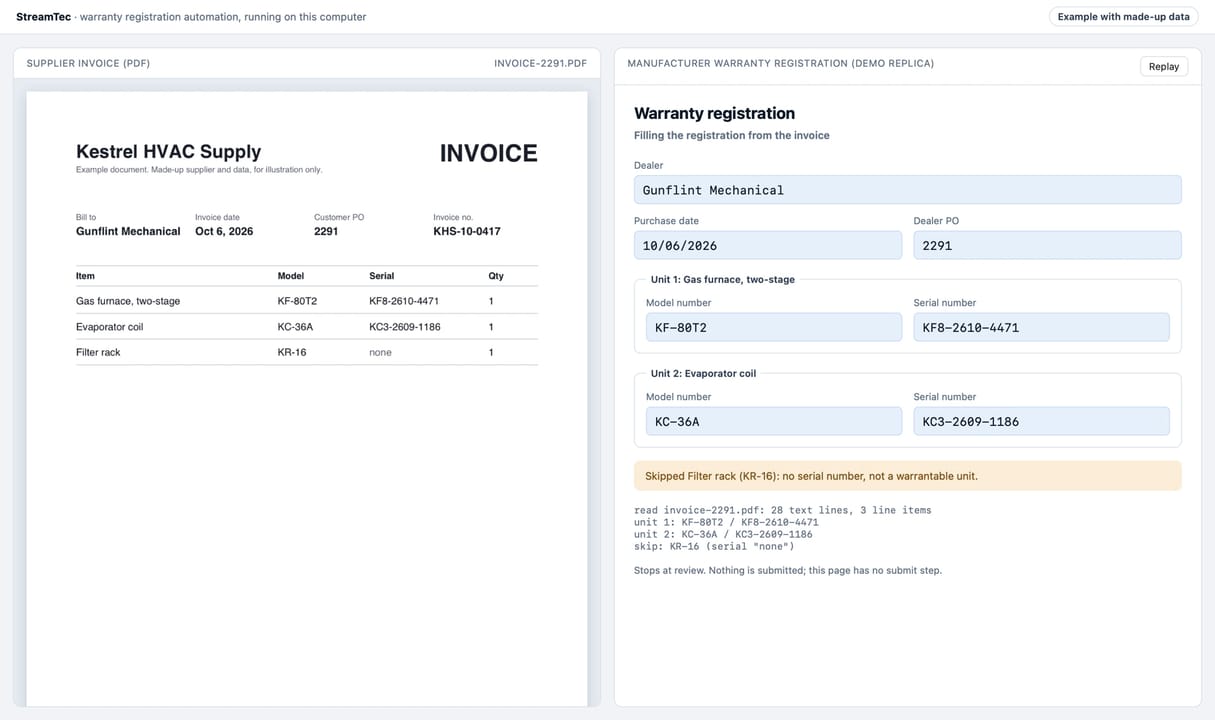
A supplier invoice PDF from Kestrel HVAC Supply sits on the left. The automation reads it and fills in the warranty registration on the right: the dealer, purchase date and PO, then the model and serial number for the furnace and the coil. The filter rack has no serial number, so it gets skipped. It stops at review and submits nothing.
Why the 90 days matter.
Bryant says most of its equipment comes with a 10-year standard parts limited warranty when it’s registered within 90 days of install. Miss the window and it’s 5 years, except where the law doesn’t allow that condition.Bryant’s warranty page
It’s the same typing every time
Model, serial, install date and job address, copied off the invoice into Bryant’s form one unit at a time.
It slips when you’re busiest
Registrations get done when someone in the office has a free minute, and in the busy season nobody does.
The homeowner calls you
When a part fails on a unit that wasn’t registered in time, it’s your shop that hears about the shorter warranty.
Watch the real automation run.
A recording of the actual automation on made-up invoices and a practice copy of a manufacturer’s registration page. It reads each invoice, registers every unit, logs the confirmations and flags what a person needs to look at.
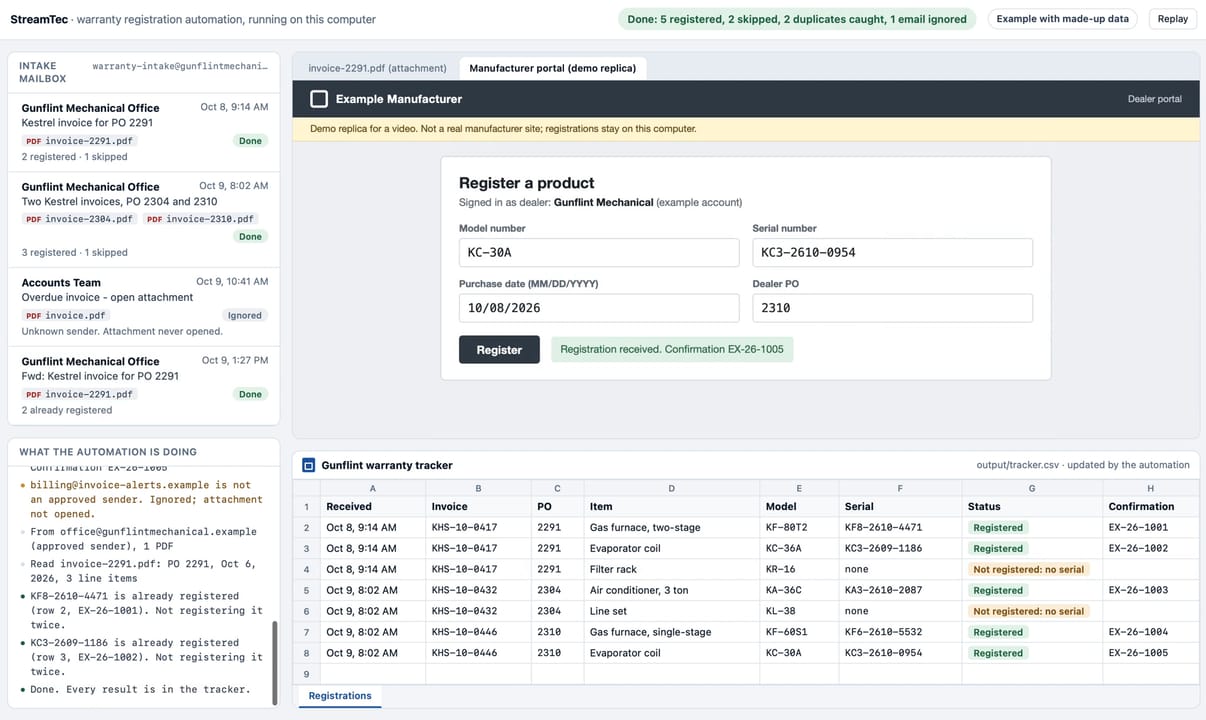
The automation checks an intake mailbox, ignores an attachment from an unknown sender, and reads each supplier invoice PDF from an approved one. It registers every unit on a replica of a manufacturer portal, logs each one in a tracker sheet with its confirmation number, flags the filter rack and the line set as not registered because they have no serial number, and catches two units that were already registered.
How it works
From the invoice email to a confirmed registration.
Invoices come to one inbox
Your distributor already emails your invoices. They go to one address, and only mail from senders you approve gets opened.
It reads every unit
Model and serial numbers, dates and job details come off each invoice. A part without a serial number gets skipped, not guessed.
It fills in Bryant’s form
Every field goes in the way your office would type it, and the form gets read back and checked before anything is submitted.
Bryant confirms it
The confirmation is logged, and the unit is looked up on Bryant’s site to make sure it’s really registered.
Anything odd goes to your office
A serial that doesn’t check out, a model that doesn’t match Bryant’s record or a missing detail gets held, and your office gets an email about it.
Why it checks first
When it isn’t sure, it asks your office.
Invoices have typos. A serial number that’s one digit off gets registered to a unit the homeowner doesn’t own, and nobody finds out until a part fails.
So it doesn’t guess. When something on an invoice doesn’t check out, it holds that unit and emails your office about it. If it’s a serial number, someone can reply with the right one, and the unit gets registered once it passes every check again. Anything else comes to your office with the details, so a person can take care of it.
- Read twiceevery serial number, by two different AI models, before anything is submitted
- Matchedevery model number against what Bryant has on file for that serial
- Heldany unit that doesn’t check out, with an email to your office about it
What changes for your office.
No new software
Your distributor, your invoices and Bryant’s site all stay the same. There’s nothing to install and no field service platform to buy.
You pick how hands-off
It can submit on its own once every check passes, or wait for someone in the office to approve each unit first.
Some brands stay manual
A few manufacturers block automated tools on their sites. Units from those brands get flagged so a person can register them.
Careful by design.
A wrong registration is worse than a slow one, so it’s built to stop and ask instead of guess.
Approved senders only
Any email or attachment from a sender you didn’t approve gets left alone.
Logged before it clicks
Each submission is written to the tracker before the click, so there’s always a record of what was sent.
Never sent twice
A unit that’s already registered gets caught instead of sent again.
Unsure means look it up
If it can’t tell whether a registration went through, it looks the unit up instead of trying again.
No shortcuts
It never tries to get around a CAPTCHA or a bot check. It stops, holds the units and tells us.
Watching for changes
A weekly check of Bryant’s form catches changes before they turn into bad registrations.
Do I need ServiceTitan or Housecall Pro?
No. It works from the invoice emails your distributor already sends, so it doesn’t matter what software you run the shop on.
What does it register?
Each serialized unit on the invoice, on Bryant’s own registration site, with the details Bryant asks for. Parts without a serial number, like a filter rack, get skipped and listed in the tracker.
What if the invoice has a typo?
Every serial number gets read twice by two different AI models and checked against Bryant’s serial format, and every model has to match what Bryant has on file for that serial. If something doesn’t check out, the unit is held and your office gets an email about it. Nothing gets registered on a guess.
Can it register other brands?
Each manufacturer’s site gets its own setup, and we already run one on another manufacturer’s site for an equipment distributor. A few manufacturers block automated tools, and those units stay with a person.
What does it cost?
Every setup is quoted in writing before any work starts or any charge is made. Ask on the audit form and you’ll get the full price.
What happens to my customers’ information?
It’s used only to register their units. The invoice is read by AI models through a service that only uses providers whose policies say they don’t keep the data or train on it. The results are kept in a tracker set up just for your shop. It’s never sold, and it’s never used in another client’s work. Our privacy policy has the details.
What if Bryant changes its website?
The weekly check of Bryant’s form catches it, and we update the automation. That’s part of the ongoing support.
How do we get started?
Start with the free audit. We look at how your office handles registrations today, then the automation runs on your real invoices in a sandbox before it’s allowed to submit anything.
Are you part of Bryant?
No. StreamTec is an independent company and isn’t affiliated with or endorsed by Bryant. We automate the registrations your office already does on Bryant’s site.
How does your office handle registrations now?
Tell us, and we’ll send back a short written plan for taking them off your plate. It’s free, and it’s yours to keep.
Bryant is a trademark of its owner, used here only to describe the registrations we automate. StreamTec isn’t affiliated with or endorsed by Bryant. Warranty terms are Bryant’s, so check Bryant’s warranty page for the terms on a specific unit.